Want to learn how to trade crypto without risking real money first?
Crypto paper trading lets you practice with virtual funds while using live market prices. It is a practical way to learn order types, position sizing, stop-loss placement, and trade review before you put actual capital on the line.
This guide explains what crypto paper trading is, what it helps with, what it does not fully replicate, and how to start step by step. I use CoinRithm's Mock Trade as the working example, but the process is the same on most paper trading platforms.
If you want to follow along with the same workflow shown in this guide, you can start paper trading on CoinRithm. It is free to use, uses virtual funds, and does not require a real deposit to begin practicing.
Ground truth:
- All trading on CoinRithm is simulated. No real money is ever at risk.
- CoinRithm is not a broker or exchange. Paper trading is for practice and strategy testing only.
- Your starting balance is $50,000 in mock USD — not real USDT or stablecoins.
What you can practice on CoinRithm right now:
- Spot paper trading — buy and sell hundreds of coins with mock USD
- Futures paper trading — up to 20x leverage, stop-loss, take-profit, mirrored liquidation
- Prediction market mock trading — stake mock USD on real-world outcome markets ($10 minimum)
- Agentic trading — connect an AI agent via ChatGPT Actions or MCP to trade on your behalf
- Agent Arena — compete publicly by realized paper PnL against other traders and AI agents
Read the futures guide if you want the leverage mechanics specifically, or the agentic trading guide if you want to automate strategy testing.
TL;DR
- Paper trading lets you practice with virtual funds using real-time crypto prices.
- Use position size + stop-loss distance to control risk per trade.
- Track results with a journal, performance metrics, and AI feedback.
- Most beginners should practice 1-3 months before risking real money.
- Keep paper trading alongside small real trades once you're ready.
- Paper trading builds technical skill well, but it does not fully simulate the emotions of real money.
If you already know you want a platform to practice on, try CoinRithm Mock Trade and then use the steps below as your setup checklist.
Best Crypto Paper Trading Apps (Comparison)
An at-a-glance overview of popular options and who they suit.
This is a neutral overview of common options people use. The right choice depends on what you want to practice: spot vs. derivatives, chart execution vs. app workflow, and manual trading vs. system testing.
For the specific keyword how to paper trade crypto, searchers usually want a practical setup they can follow right away, not a long theory section. So the goal here is simple: help you choose a workable simulator quickly, then get you into your first practice trade.
Quick comparison
- All-in-one simulator: CoinRithm. Best for structured learning with paper trades, portfolio tracking, tasks, and feedback in one place.
- TradingView paper trading: Best for chart-first traders who want to place simulated orders directly on advanced charts.
- Exchange testnets: Great for learning exchange-specific order flows and fees in a sandbox environment.
- Binance Mock Trade: Useful if you plan to trade on Binance and want to practice with their interface.
- eToro virtual portfolio: Good for beginners who want a simple, social-trading style experience.
How to choose
- If you want education + tracking, use a learning-focused simulator.
- If you want chart practice, use a charting simulator like TradingView.
- If you want platform familiarity, use that exchange's testnet or demo trading mode.
- If you want to practice your actual routine as a beginner, choose the platform you are most likely to use consistently for 30 to 90 days.
What to look for in a good crypto paper trading app
The best simulator for you is not always the one with the most features. It is the one that helps you practice the skills you actually need.
Look for:
- Real-time or near-real-time price data
- Support for basic order types like market and limit orders
- Clear portfolio and PnL tracking
- Easy journaling or trade review workflow
- Mobile access if you plan to trade on mobile
- A simple enough interface that you will actually keep using it
- No unnecessary signup friction if you just want to start practicing
If you are only tracking prices and not placing simulated trades, you are researching, not paper trading. Both are useful, but they are not the same activity.
What Is Crypto Paper Trading
Clear definition and why it matters before you risk real money.
Crypto paper trading is the practice of trading cryptocurrencies with virtual funds to test strategies and learn market dynamics without financial risk.
You get real-time market data and actual cryptocurrency prices. CoinRithm starts you with $50,000 in mock USD — a virtual balance used for practice only.
Paper Trading vs Demo Account vs Simulator
These terms are used interchangeably, but they all mean the same thing:
- Paper trading = Traditional term from stock markets (trades were written on paper)
- Demo account = Modern term used by trading platforms
- Crypto simulator = Another way to describe virtual trading
- Mock trading = Same concept (term used by CoinRithm)
- Virtual trading = Practice trading with fake money
All refer to practice trading with virtual funds.

Why Paper Trade Before Using Real Money
Most crypto beginners lose money in their first months. Here's why paper trading matters:
Zero financial risk – Learn without losing your savings
Test strategies – See what works before investing real capital
Master order types – Practice market orders, limit orders, stop-losses
Build confidence – Reduce emotional decision-making
Track performance – Understand your win rate and weaknesses
Experience volatility – Learn to handle 20%+ daily price swings
Develop discipline – Build consistent trading habits
The goal isn't to practice forever—it's to build competence so you don't blow up your account when switching to real money.
Common Paper Trading Mistakes to Avoid
Even with virtual money, traders make critical errors that hurt their learning:
Trading amounts you'd never risk – Practice with realistic position sizes
Ignoring risk management – Treat virtual money like real money
Chasing every trade – Quality over quantity
Not tracking results – Keep a journal of wins and losses
Skipping emotional awareness – Notice your reactions to gains and losses
Paper trading too long – Don't stay in practice mode for years
Best practice: Trade with the same discipline you'll use with real money.
How to Start Paper Trading Crypto (Step-by-Step)
Follow these steps to place your first paper trade quickly and confidently.
This walkthrough uses CoinRithm's Mock Trade, but the same beginner flow applies almost everywhere: create an account, choose a liquid coin, place a small simulated trade, define risk, and review the result.

Step 1: Create Your Free Account
Time required: 60 seconds
- Visit CoinRithm
- Click "Sign Up" in the top right
- Enter your email and create a password
- Verify your email address
- You're in—no KYC required, no ID, no phone number, no credit card
Important: CoinRithm is 100% free for paper trading with no KYC verification. You'll never be asked to deposit real money to practice.
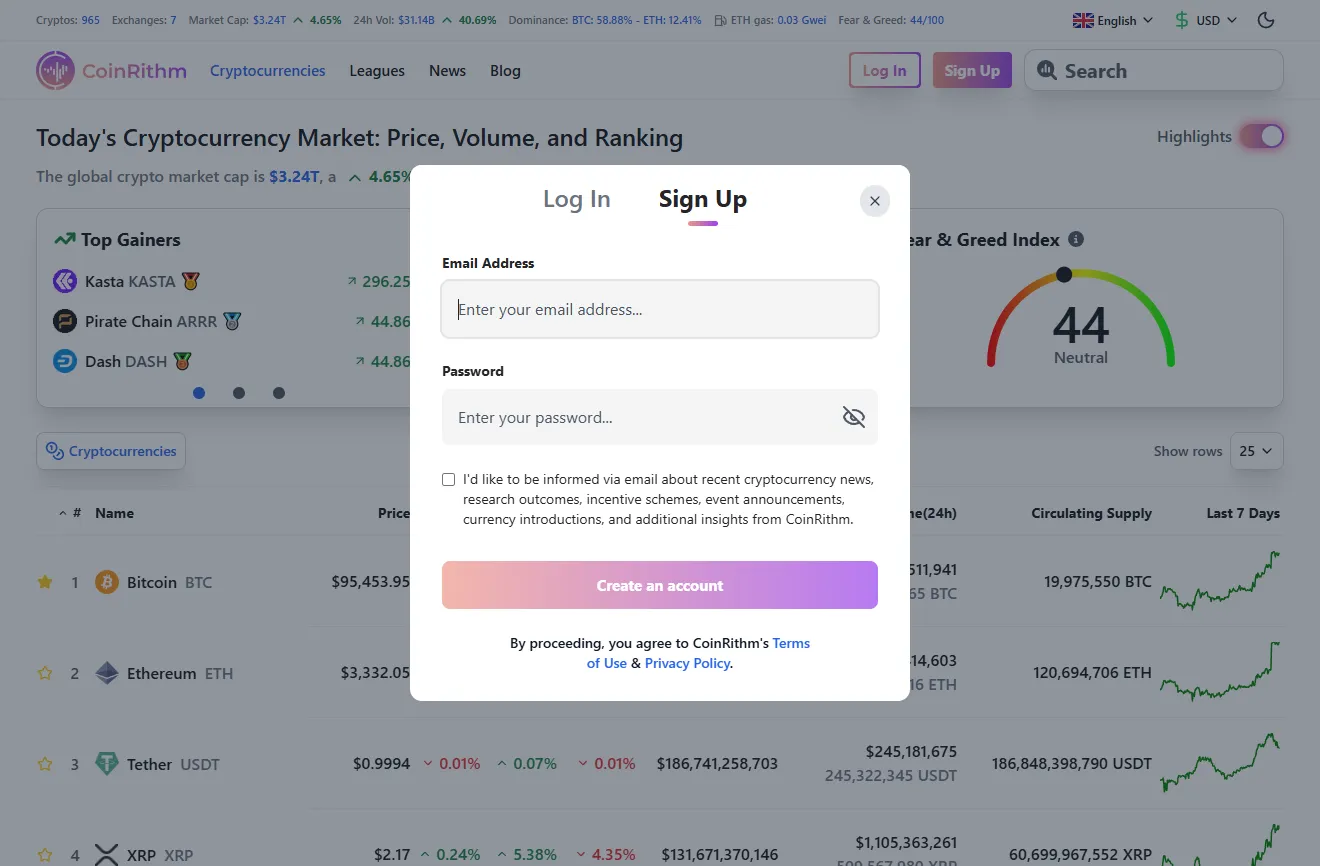
Figure: CoinRithm Sign-Up Screen.
Step 2: Navigate to Mock Trade
Once logged in, you have two ways to start paper trading:
Option 1: From the Dashboard
- Navigate to your Dashboard
- You'll see your profile with your league rank (starts at Bronze), XP progress, and daily tasks
- Check the Mock Trade section showing your current virtual balance
- Click "Mock Trade" to view your full virtual wallet
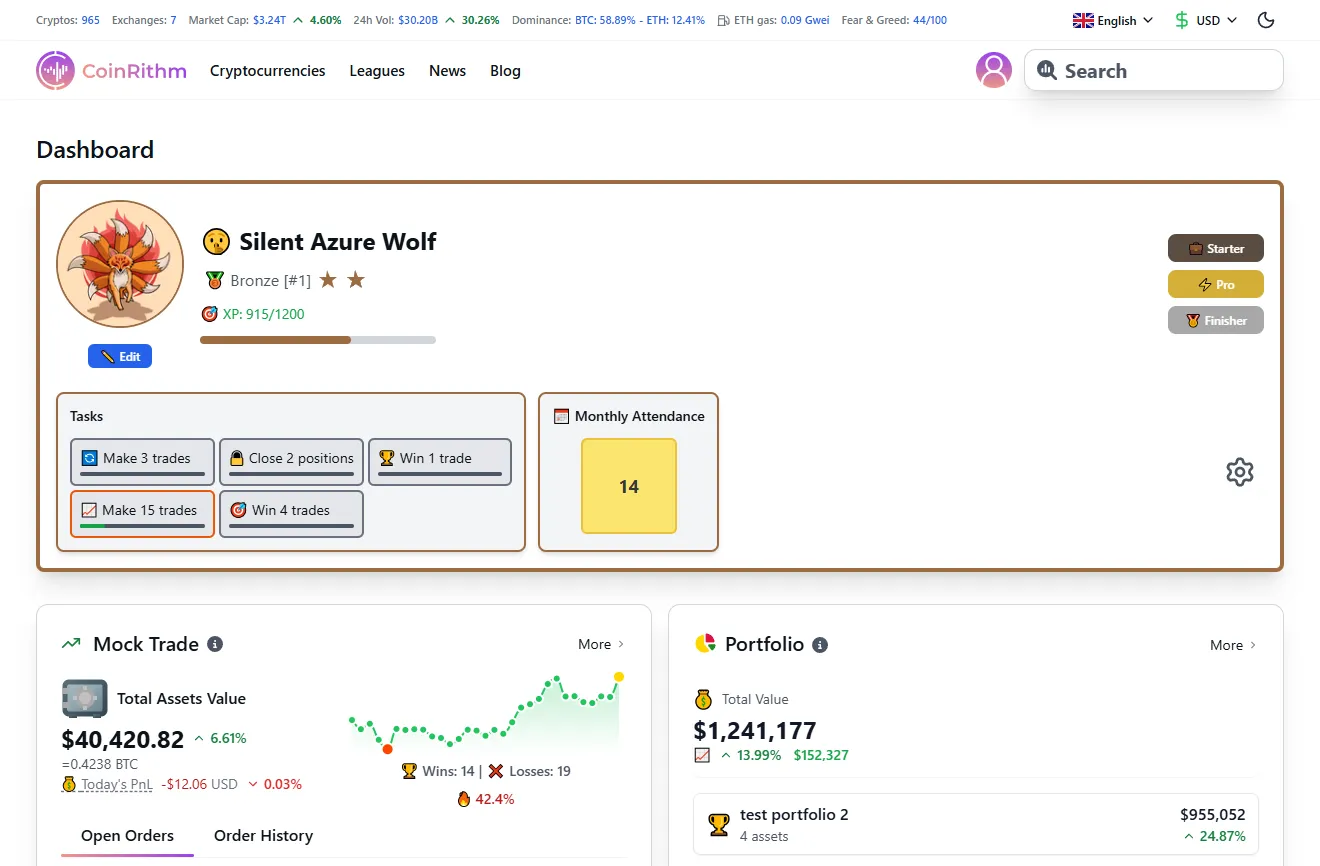
Figure: Dashboard showing league rank, XP progress, tasks, and Mock Trade overview.
Option 2: From Any Coin Page
- Browse Cryptocurrencies or search for a specific coin
- Click on any coin (e.g., Bitcoin)
- On the coin page, you'll see two buttons:
- "Mock Trade" – Place a paper trade immediately
- "Track in Portfolio" – Add to your portfolio for tracking
- You can also add the coin to your Watchlist using the star icon
What you'll see on the coin page:
- Real-time price and 24h change
- Interactive TradingView price chart
- Market data (Market Cap, 24h Volume, Circulating Supply)
- Latest news from multiple sources
- Order interface (Buy/Sell with Limit, Market, Stop-Limit options)
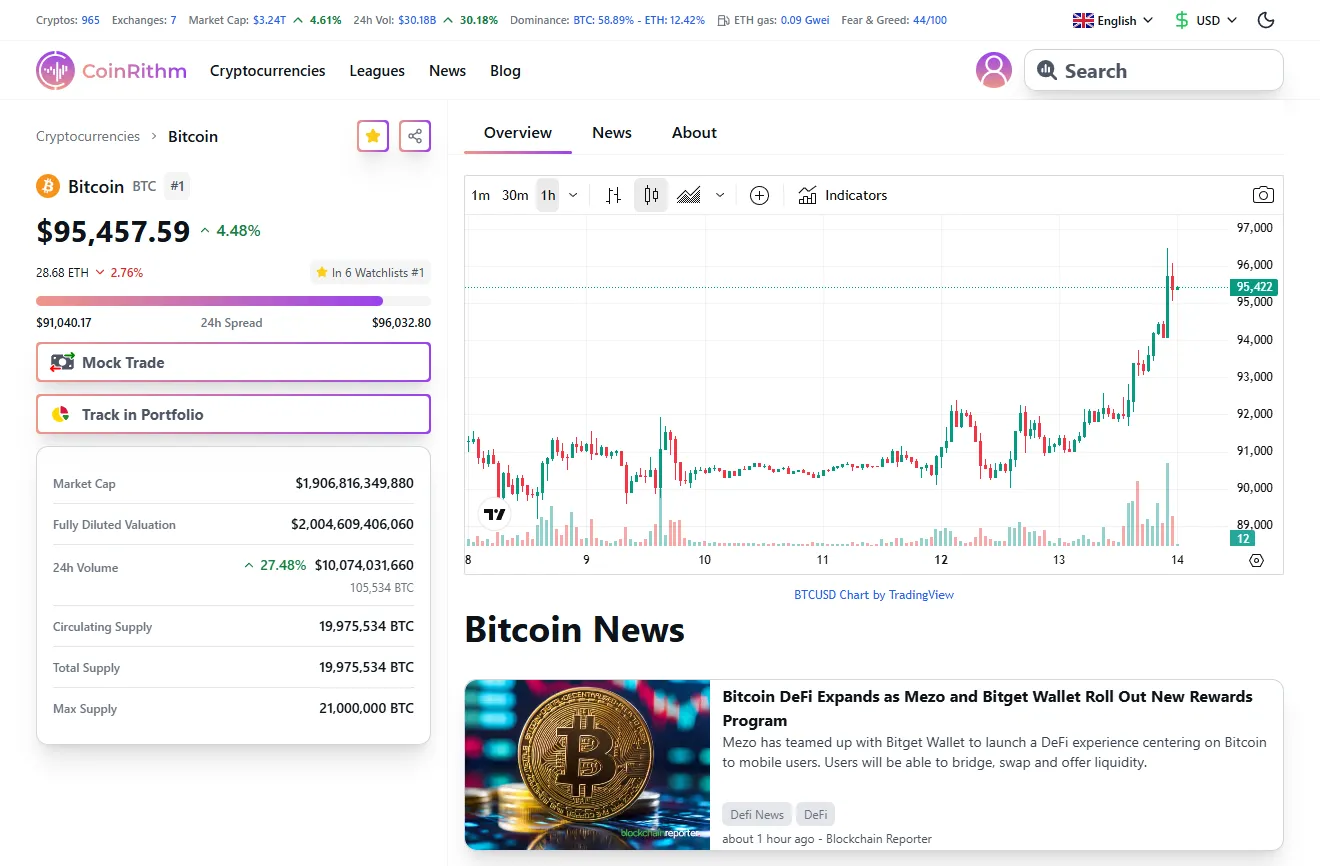
Figure: Bitcoin coin page with Mock Trade and Track in Portfolio buttons.
Step 3: Place Your First Mock Trade
To place a mock trade, select your coin, choose 'Market Order' for instant execution, and enter your mock USD amount.
Here's how to place your first paper trade using Bitcoin as an example:
Step-by-step:
-
Navigate to Bitcoin page – Search for Bitcoin or click it from the top cryptocurrencies list
-
Click "Mock Trade" – The button on the left sidebar opens the order interface
-
Choose Buy or Sell – Select the "Buy" tab (green) at the top of the order window
-
Select order type – Three options available:
- Limit Order – Set your own price (order fills only when market reaches your price)
- Market Order – Execute immediately at current price ← Start here for beginners
- Stop-Limit Order – Advanced order type for stop-loss protection
-
Enter your amount – For a Market order:
- Amount field: Enter how much BTC you want to buy (e.g., 0.01 BTC)
- The Total field automatically calculates cost in USDT
- You'll see your Available balance (starts at $50,000 mock USD)
- Max Buy shows the maximum BTC you can purchase
-
Review and execute – Click "Buy BTC" button
What happens after your order:
- Success notification appears
- Your USDT balance decreases by the purchase amount
- Your BTC holdings appear in the Mock Trade holdings table
- The trade records in Order History with timestamp, price, and amount
- Your Total Assets Value updates in real-time
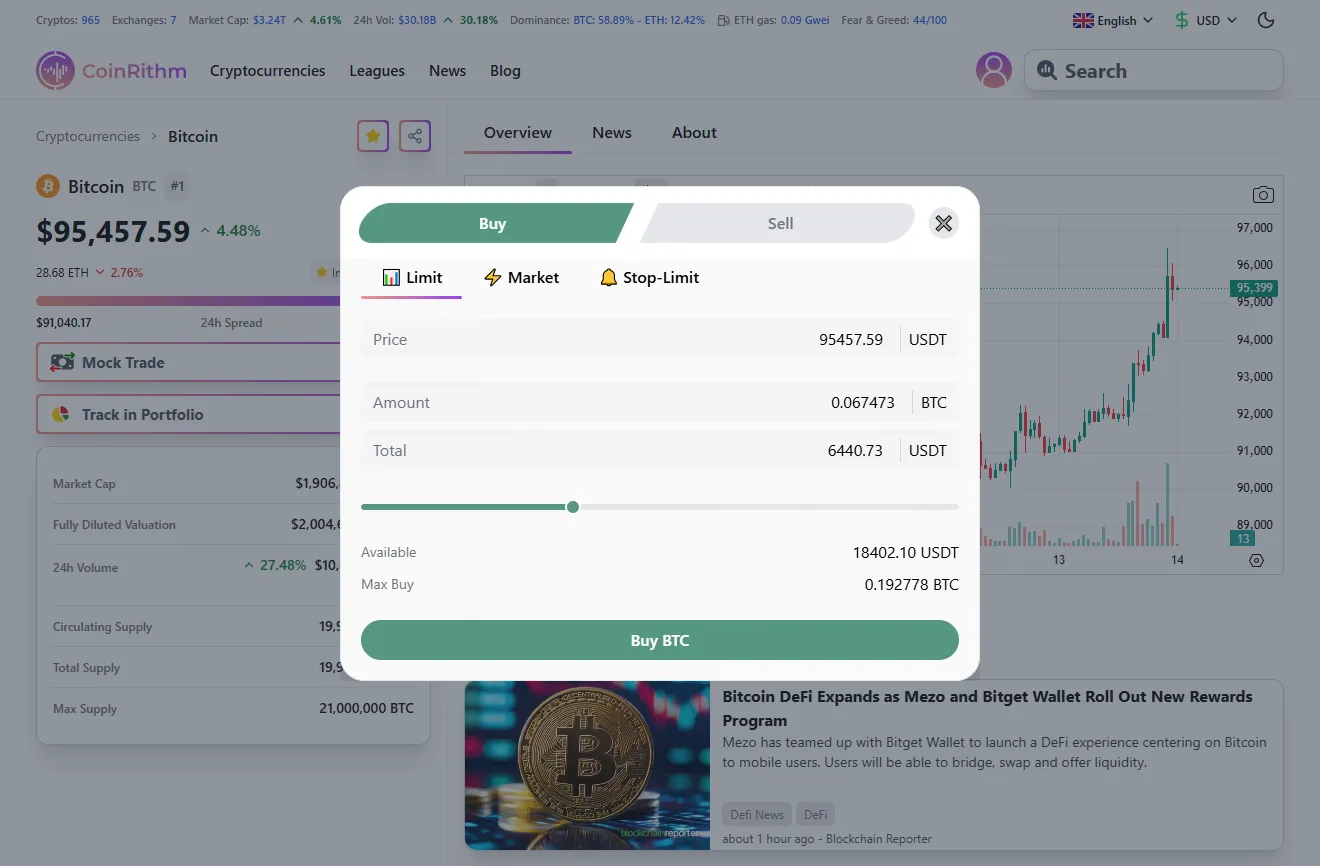
Figure: Bitcoin order interface showing Market buy order with Available balance and Max Buy.
Pro tip: Start with 2-5% of your virtual balance per trade ($1,000-$2,500 out of $50,000). This is a position size guideline; your risk per trade is set by your stop-loss distance (risk = position size x stop-loss %).
Ready to put this into practice Start your first Mock Trade on CoinRithm.
Step 4: Track Your Trade Performance
After placing your trade, navigate to the Mock Trade page to track everything:
Performance Overview (Top Section):
- Total Assets Value – Your entire virtual portfolio value (USDT + all crypto holdings)
- Today's PnL – Profit/loss for the current day with percentage change
- Wins & Losses – Count of profitable vs losing trades (e.g., "Wins: 14 | Losses: 17")
- Win Rate – Your success percentage (e.g., "45.2%")
Portfolio Allocation Chart:
Visual pie chart showing your holdings distribution by coin (e.g., BTC 47.0%, SOL 28.6%, USDT 14.6%, etc.)
Holdings Table:
Detailed view of each asset with columns:
- Name – Cryptocurrency with icon
- Available – Balance available for trading
- Frozen – Balance locked in open orders
- Total Assets – Total holdings of that coin
- USD Value – Current value in dollars
- Live / Avg Cost (USDT) – Current price vs your average purchase price
- Cumulative PnL – Total profit/loss for that coin with percentage
- Today's PnL – Today's profit/loss for that coin
Note: Your wallet base is USDT, while the UI may display USD-equivalent values for convenience.
Order Tracking:
- Open Orders tab – View active limit orders waiting to fill
- Order History tab – Complete history of all executed trades with buy/sell color coding, prices, amounts, and timestamps
Important Note: At the bottom of the page you'll see: "This doesn't represent any real money. It's for practice purposes only."
Your Mock Trade page updates in real-time as cryptocurrency prices change, giving you accurate practice data that mirrors live market conditions.
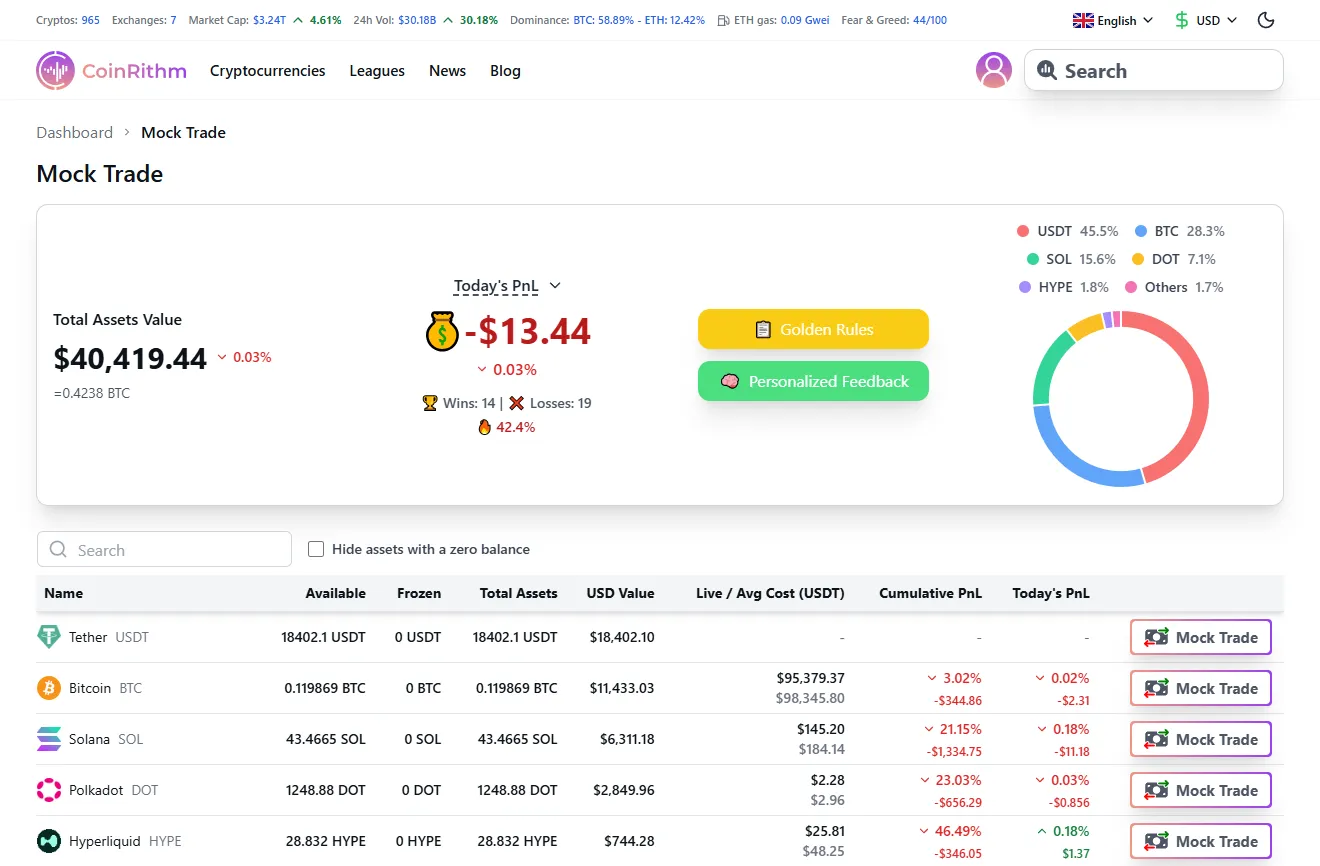
Figure: Mock Trade page showing portfolio overview, Today's PnL, holdings table, and performance metrics.
Step 5: Review AI Feedback
CoinRithm provides two types of AI-powered feedback to accelerate your learning:
Golden Rules (Yellow Button):
Click the "Golden Rules" button to view 10 fundamental trading principles covering risk management, emotional discipline, and strategic planning. The modal appears once per day to reinforce best practices.
The 10 Golden Rules:
- Never Add to a Losing Position - Cut losses early. Never average down.
- Always Use a Stop-Loss - Set exit points before entering a trade.
- Risk Management First - Never risk more than 1-2% of capital per trade.
- Plan Every Trade - Define entry, exit, and risk before placing orders.
- Trade with the Trend - Follow trend confirmation to reduce risk.
- Keep Emotions in Check - Fear and greed lead to poor decisions.
- Diversify, but Don't Overdo It - Too many positions complicate risk management.
- Avoid Overtrading - Trade quality over quantity. Patience pays off.
- Learn from Mistakes - Review past trades to improve your strategy.
- Stay Updated on Market Conditions - News and events impact prices.
Important: The Golden Rules modal appears once per day to reinforce discipline without overwhelming you. Review these principles before placing trades to build best practices into your trading routine.
Personalized Mock Trade Feedback (Green Button):
Click the "Personalized Feedback" button to access AI analysis of your past trades:
What you'll see:
- Trade History Table with columns: Name, Entry (price + amount), Exit (price + amount), PnL (percentage + dollar), Date
- Each trade shows color-coded profit/loss (red for losses, green for gains)
- Two button states per trade:
- "Get Feedback" (blue) – Click to generate AI analysis for that specific trade
- "See Feedback" (green) – View previously generated feedback
How it works:
- Select a trade and click "Get Feedback"
- AI analyzes the trade (usually takes a couple of minutes)
- Come back later or wait for the analysis
- Click "See Feedback" to view AI insights on:
- Entry timing and execution quality
- Exit strategy effectiveness
- Risk management assessment
- Market conditions during the trade
- Suggestions for improvement
Note: At the bottom of the feedback window: "AI generated feedback might be wrong." – Use AI insights as learning tools, not absolute truth.
This dual feedback system helps you learn general principles (Golden Rules) while also getting specific analysis of your actual trading decisions (Personalized Feedback).
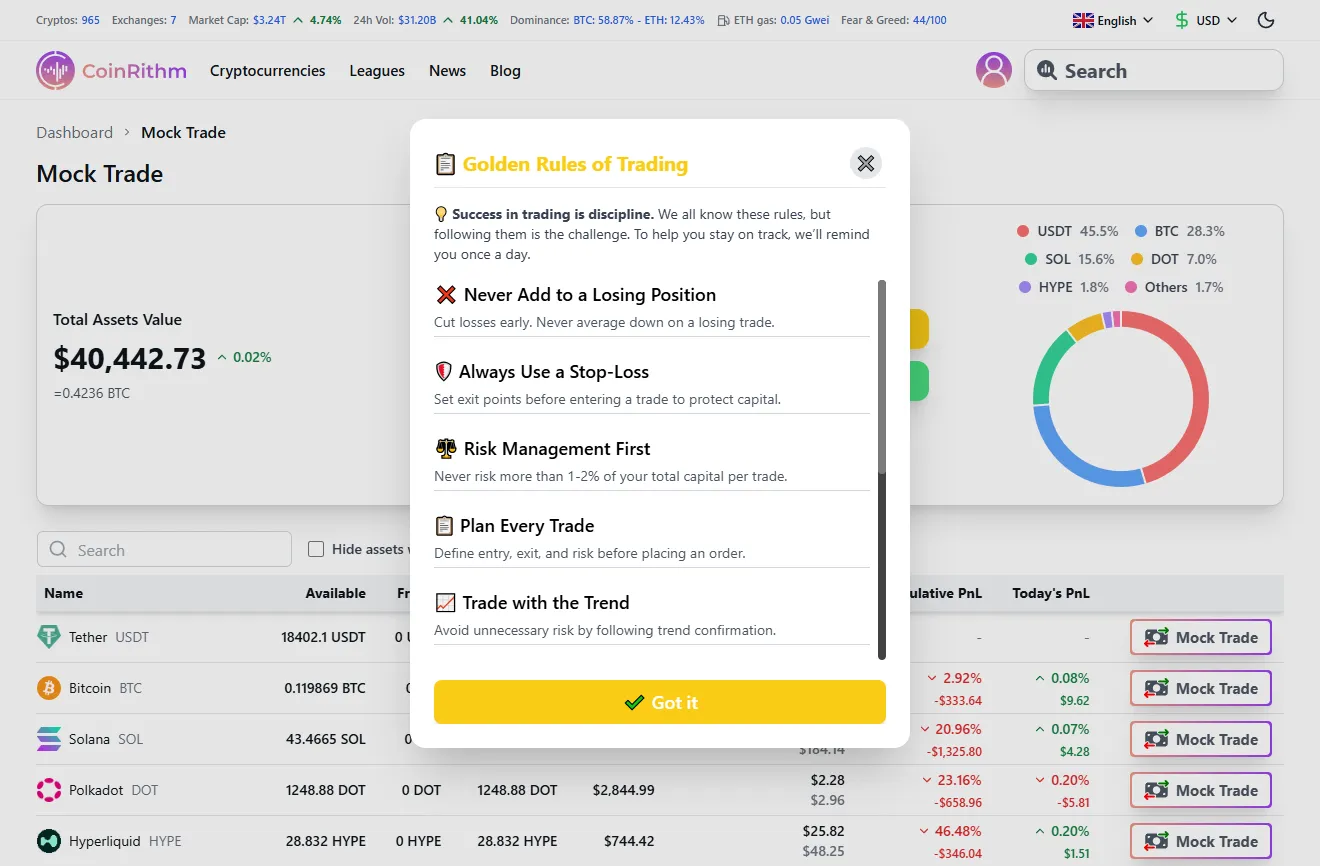
Figure: Golden Rules modal showing 10 trading principles with yellow header.
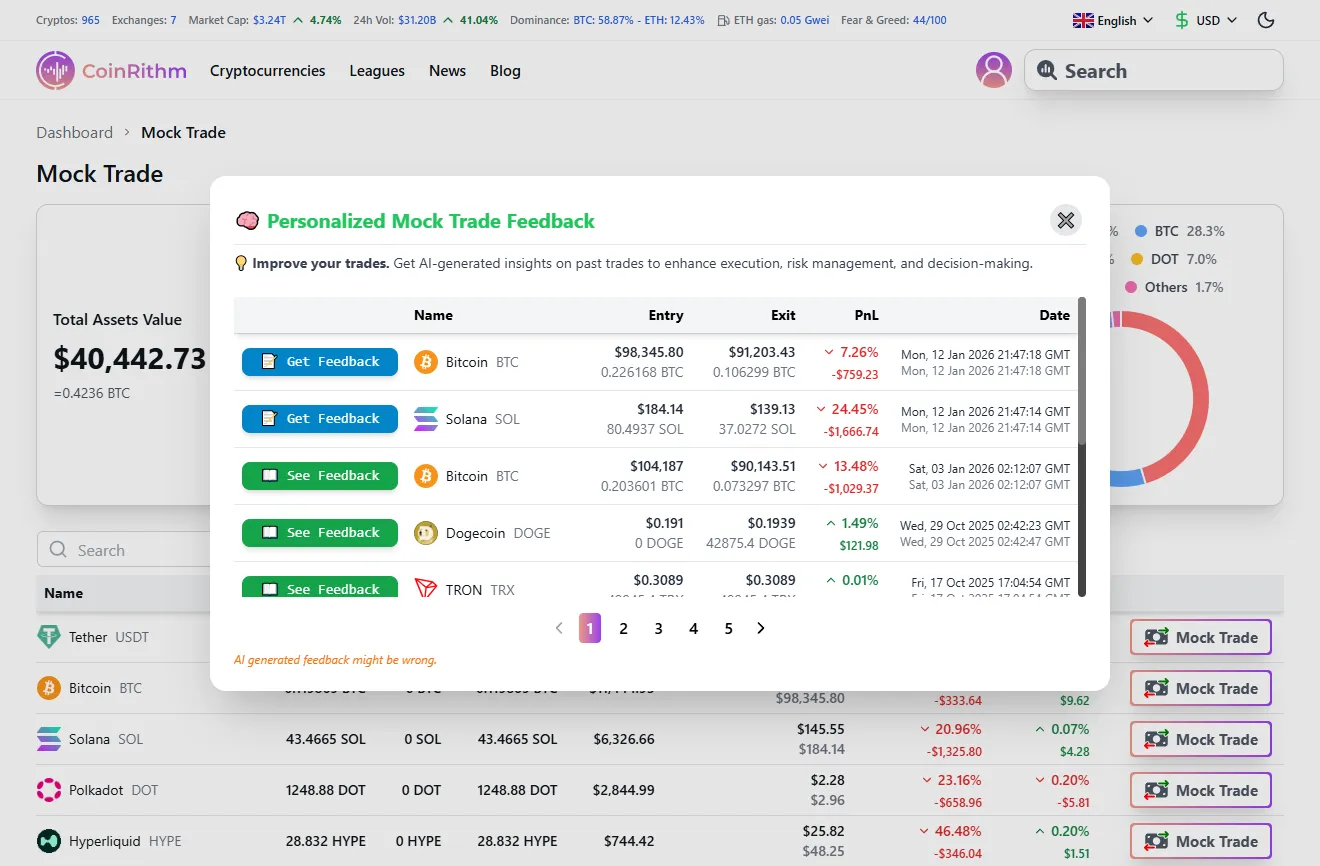
Figure: Personalized Feedback interface showing trade history with Get Feedback and See Feedback buttons.
Beginner First 7 Days Plan
A simple one-week routine to build habits without overwhelm.
Follow this simple routine to build discipline fast. Keep it light: one trade per day, one journal entry per day.

Day 1: Place one small market trade on a major coin, then log the entry, stop-loss, and reason.
Day 2: Place one limit order and write why you chose the price.
Day 3: Add a stop-loss and take-profit to your trade, then record the risk/reward.
Day 4: Practice position sizing (2-5% allocation) and note the exact risk in USDT.
Day 5: Try a different coin and record how volatility feels compared to BTC.
Day 6: Repeat your best setup from Days 1-5 and focus on clean execution.
Day 7 (Review Day): No trade. Review all journal entries, summarize 3 wins, 3 mistakes, and 1 rule to improve.
Understanding the Mock Trade Interface
A fast walkthrough of the balances, order types, and data you will use.
This section breaks down each element of the Mock Trade interface so you know exactly what you're looking at.
Virtual Balance and Starting Capital
Default starting balance: $50,000 mock USD (virtual)
This amount is designed to:
- Mirror realistic trading capital for intermediate traders
- Allow multiple positions without over-leveraging
- Practice diversification across 5-10 different coins in your virtual wallet
- Test risk management with meaningful position sizes
How your balance changes:
- Decreases when you buy crypto with USDT
- Increases when you sell crypto back to USDT
- Stays constant while holding crypto (USDT balance is stable)
Example:
- Start: $50,000 mock USD
- Buy $5,000 of BTC → Balance: $45,000 mock USD + $5,000 BTC
- BTC increases 10% → Portfolio: $45,000 mock USD + $5,500 BTC = $50,500 total
- Sell BTC → Balance: $50,500 mock USD (you made $500 profit)
Order Types Explained
CoinRithm supports the essential order types you'll use in real trading:
Market Order
Executes immediately at the current market price.
Use when:
- You want to enter/exit a position right now
- Price precision isn't critical
- Market is moving fast and you need certainty
Example:
- BTC is $45,000
- You place a market buy for $1,000
- Order fills instantly at ~$45,000 (you get ~0.0222 BTC)
Limit Order
Executes only when price reaches your target.
Use when:
- You want to buy at a lower price than current market
- You want to sell at a higher price than current market
- You're patient and willing to wait for your price
Example:
- BTC is $45,000
- You place a limit buy at $44,000 for $1,000
- Order fills only if BTC drops to $44,000 or lower
Practice both order types to understand when each is appropriate.
Reading Real-Time Price Data
Every coin in CoinRithm shows:
- Current Price – Live price in USDT
- 24h Change – Percentage gain/loss in last 24 hours (green = up, red = down)
- 24h High/Low – Price range in last 24 hours
- Market Cap – Total value of all coins in circulation
- Volume – Total trading activity in last 24 hours
What to watch:
- High volume + price increase = Strong buying pressure (bullish)
- High volume + price decrease = Strong selling pressure (bearish)
- Low volume = Less certainty, wider spreads, more risk
Setting Stop-Loss and Take-Profit
Stop-Loss = Automatic sell order if price drops to your risk threshold Take-Profit = Automatic sell order if price hits your profit target
Why they matter:
- Protect your capital from large losses
- Lock in profits before reversals
- Remove emotion from exit decisions
- Critical risk management tools
Example Setup:
- Buy BTC at $45,000
- Set Stop-Loss at $43,000 (protect against 4.4% loss)
- Set Take-Profit at $47,500 (lock in 5.6% gain)
Practice using these orders in paper trading so they become second nature before using real money.
Complementary Features: Portfolio and Watchlist
How tracking tools support your learning alongside Mock Trade.
These tools are useful, but they are not the core of learning how to paper trade crypto.
- Use Portfolio when you want to track real holdings separately from your practice account.
- Use Watchlist when you want to monitor coins before deciding whether they belong in a trade setup.
If you want the deeper workflows, use these dedicated guides:
For this article, the main workflow stays simple: choose a liquid coin, place a planned trade, manage risk, and review the result.
Gamification: Leagues, Tasks, and Achievements
How progression systems keep you motivated and consistent.
Gamification is optional. The useful part is not the badge, XP, or rank by itself. The useful part is whether those systems help you repeat the right process: plan, execute, review, improve.
If leagues, tasks, or streaks help you stay consistent, use them. If they distract you, ignore them and stick to your trade journal and review process.
If you want the full breakdown, read:
Trading Principles and AI Feedback
Core rules and AI insights that help you improve faster.
CoinRithm helps you learn through trading principles and AI-powered trade analysis.
Golden Rules
What it is: 10 fundamental trading principles to guide your decision-making.
Access: Click "Golden Rules" button (yellow) in the Mock Trade page.
Full list appears above: Jump to the Golden Rules list.
AI-Powered Trade Feedback
What it is: AI analysis of your specific trade decisions with detailed insights and actionable recommendations.
Access: Click "Personalized Feedback" button (green) in Mock Trade page, then click "Get Feedback" or "See Feedback" next to any completed trade.
What you'll see in the AI feedback modal:
1. Trade Summary Header:
- Trade type (BTC SELL/BUY) with key metrics
- Entry price → Exit price with P&L percentage and dollar amount
- Hold time (e.g., "Hold 0d 9h")
- Position size sold (e.g., "Sold 36.0% (0.1 BTC)")
Example:
BTC SELL • Entry $104,187.34 → Exit $90,143.51 • P&L -$1,029.37 (-13.5%) • Hold 0d 9h • Sold 36.0% (0.1 BTC)
2. Detailed Analysis Paragraph:
AI explains your decision-making and outcome in plain language:
Your exit at $90,143.51 after a 0d 9h hold from $104,187.34, selling 0.07 BTC (36.0% of the position), looks fear-driven rather than rule-based. Since exit, BTC moved to $91,307.16 (+1.3%), and the market showed a Golden Cross with RSI 52.2, suggesting you missed a potential bounce.
3. Market Analysis (Blue Box):
Technical insights about market conditions during your trade:
Technical insight: despite a Golden Cross and RSI 52.2, your exit at $90,143.51 came on a minor pullback (price just ~0.1% below SMA20) while the current price is 91,307.16, +1.3% from exit; adopt a rule to exit only after a clear close below SMA20 with RSI under 50.
4. 🥉 Your League Progress:
Shows your current rank, record, and win rate:
Bronze • 14W-17L • 45.2% win rate — steady improvement: your Sharpshooter badge is closer.
5. Next Trade Action Plan (Green Box):
Specific, actionable recommendations for your next trade:
Next trade action: limit size to 12% of wallet (≈$4,725) and re-enter only on a 1-hour close above $92,000 with RSI > 55; place a stop at entry minus 2% and target a 4% gain.
Important: At the bottom: "AI generated feedback might be wrong." – Use as learning guidance, not absolute rules.
Why it's valuable: Each trade becomes a learning opportunity with specific technical analysis, emotional pattern recognition, and concrete next steps to improve your strategy.
Learning from Mistakes
Common mistakes AI feedback identifies:
Overtrading – Too many trades in a short period Feedback: "You've placed 15 trades today. Consider focusing on quality setups rather than quantity."
Poor position sizing – Risking too much per trade Feedback: "This trade represents 25% of your portfolio. Limit individual positions to 5% for better risk management."
No stop-loss – Failing to protect capital Feedback: "You entered without a stop-loss. Set one now to limit potential losses to 3-5%."
Chasing pumps – Buying after sharp price increases Feedback: "BTC is up 15% in 2 hours. Entering after parabolic moves often results in losses. Wait for consolidation."
Emotional trading – Revenge trading after losses Feedback: "You've placed 3 trades in 10 minutes after a loss. Take a break and review your strategy."
Use this feedback to develop self-awareness and avoid repeating mistakes when you trade with real money.
Developing Your Paper Trading Strategy
Practical guidance to test styles, manage risk, and set goals.
Paper trading is where you discover what works for you personally.
Testing Different Trading Styles
Day Trading
- Time horizon: Minutes to hours
- Goal: Capture small price movements multiple times per day
- Requires: Constant monitoring, fast execution, high discipline
- Practice: Place 5-10 trades per day, close all positions by end of day
Swing Trading
- Time horizon: Days to weeks
- Goal: Capture medium-term trends
- Requires: Patience, trend analysis, position management
- Practice: Hold 3-7 positions for 3-10 days each
Position Trading (Long-term)
- Time horizon: Weeks to months
- Goal: Capture major trends and market cycles
- Requires: Fundamental research, patience, risk tolerance
- Practice: Buy and hold for 30+ days, focus on major coins
DCA (Dollar-Cost Averaging)
- Time horizon: Months to years
- Goal: Reduce timing risk through consistent buying
- Requires: Discipline, long-term mindset
- Practice: "Buy" $500 of BTC every week regardless of price
Test each style in paper trading to discover which matches your schedule, personality, and risk tolerance.
Testing Automated Strategies and Scalping
Crypto paper trading bot strategies – While CoinRithm focuses on manual trading, paper trading is the perfect environment to manually test bot logic and scalping strategies before coding them.
How to use paper trading for bot development:
- Test entry/exit rules – Manually execute your bot's logic to validate if conditions trigger correctly
- Simulate high-frequency patterns – Practice scalping (quick in-and-out trades) to see if your timing rules work
- Validate risk management – Ensure your automated position sizing and stop-loss logic prevents large losses
- Track edge cases – Discover market conditions where your strategy fails before automating
Scalping practice:
- 5-15 minute holds – Enter and exit positions quickly based on small price movements
- High volume coins – Stick to BTC, ETH, BNB for tighter spreads
- Smaller position sizes – Use 1-3% positions for rapid entries/exits
- Strict stop-losses – Exit immediately if price moves against you (0.5-1% stops)
Why paper trade your bot strategy first:
Even if you plan to automate trading later, manually executing your strategy in a paper trading environment reveals flaws in your logic, helps you refine entry/exit conditions, and ensures your risk management works before you risk real capital on automated execution.
Bottom line: Paper trading isn't just for manual traders—it's where algorithmic traders test and refine their bot logic risk-free.
Risk Management Rules

The 2% Rule Never risk more than 2% of your portfolio on a single trade.
Example:
- Portfolio: $50,000
- Max risk per trade: $1,000 (2%)
- If stop-loss is 5% away, position size = $20,000 max ($20,000 x 5% = $1,000). Wide stops require smaller size, so you'd usually reduce size or tighten the stop.
- If stop-loss is 2% away, position size would be $50,000 to risk $1,000, so a 5% position cap ($2,500) becomes the limiter and your actual risk is $50.
The 5% Position Rule Never allocate more than 5% of your portfolio to a single coin.
Example:
- Portfolio: $50,000
- Max per position: $2,500
- Allows 20 different positions for diversification
Position size and risk are different. Use the position cap to limit allocation, then use your stop-loss to keep total risk under 2%.
The 3:1 Reward/Risk Ratio Only take trades where potential reward is at least 3x potential risk.
Example:
- Entry: $45,000
- Stop-loss: $44,000 (risk = $1,000 or 2.2%)
- Take-profit: $48,000 (reward = $3,000 or 6.7%)
- Ratio: 3:1
Practice these rules in paper trading until they become automatic.
Journaling Your Trades
Keep a trading journal to track:
Before the Trade:
- Date and time
- Coin and entry price
- Reason for entry (setup, signal, strategy)
- Stop-loss and take-profit levels
- Position size and risk percentage
After the Trade:
- Exit price and exit reason
- Profit/loss in USDT and percentage
- What went right
- What went wrong
- Lessons learned
Example Journal Entry:
- Date: Jan 12, 2026
- Coin: BTC
- Entry: $45,000
- Exit: $47,200
- P&L: +$2,200 (+4.9%)
- Setup: Breakout above $44,800 resistance with high volume
- Stop-loss: $43,500
- What went right: Waited for volume confirmation, set proper stop-loss
- What to improve: Could have taken partial profits at $46,500
- Lesson: Trust the strategy, don't get greedy
Copy-paste journal template:
Date:
Coin:
Setup/Reason:
Entry Price:
Position Size (USDT):
Stop-Loss:
Take-Profit:
Risk (USDT and %):

Exit Price:
Result (P/L in USDT and %):
What Went Right:
What Went Wrong:
Lesson:
Review your journal weekly to identify patterns in wins and losses.
Setting Realistic Goals
Poor paper trading goals:
- "Make $1 million in a month"
- "Win every trade"
- "Double my account every week"
Realistic paper trading goals:
- Achieve 55%+ win rate over 50 trades
- Average 2:1 reward/risk ratio
- Maintain discipline (no emotional revenge trading)
- Complete 30 consecutive days of journaling
- Graduate to real trading within 3 months
Remember: The goal isn't to get rich in paper trading. It's to build skills and confidence for real trading.
When to Transition from Paper to Real Trading
Criteria and cautions to help you avoid moving too fast.
Don't rush this step. Most beginners move to real money too soon and lose.
5 Signs You're Ready
1. Consistent Profitability
- At least 3 consecutive profitable weeks
- Win rate above 50%
- Positive P&L over 50+ trades
2. Risk Management Discipline
- You never violate the 2% rule
- Every trade has a stop-loss
- You stick to your position sizing rules
3. Emotional Control
- You don't revenge trade after losses
- You don't overtrade after wins
- You can walk away when frustrated
4. Strategy Clarity
- You have a written trading plan
- You know exactly when to enter/exit
- You stick to your strategy consistently
5. Education Completion
- You understand order types
- You can read charts and volume
- You know when not to trade
If you can check all 5 boxes, you're ready to start with small real amounts.
If you can't check all 5, keep practicing. There's no rush.
Starting with Small Real Amounts
When you're ready for real trading:
- Start with money you can afford to lose (1-5% of savings max)
- Use the same risk management rules you practiced
- Start with 1/10th the position sizes you used in paper trading
- Expect emotional differences – real money feels different
Example Transition:
- Paper trading: $50,000 virtual, $2,500 positions
- Real trading: $500 real, $25 positions (same 5% rule)
As you prove consistency with real money, gradually increase position sizes—but never violate your risk rules.
Why Paper Trading Never Fully Replicates Real Trading
What transfers well:
Technical analysis skills
Order execution knowledge
Strategy logic and setup recognition
Chart reading ability
What doesn't transfer:
Emotional pressure – Fear and greed feel different with real money
Psychological discipline – Easier to follow rules with fake money
Real slippage – Paper trading may not perfectly simulate order fills
Account growth pressure – No real stakes in paper trading
Slippage and Liquidity (Paper vs Real)
Paper trading fills often assume ideal liquidity. In real markets, fast moves, thin order books, and large order sizes can cause partial fills or worse prices. Expect small differences between your planned entry/exit and the actual fill, especially on lower-volume coins.
The solution: Paper trade until profitable, then start small with real money to learn emotional control.
The Hybrid Approach
Best strategy once you start real trading:
Paper Trading (Ongoing):
- Test new strategies
- Practice with risky setups
- Try different trading styles
Real Trading (Cautiously):
- Execute proven strategies only
- Use conservative position sizes
- Build emotional discipline
If you use CoinRithm, you can keep practicing with Mock Trade while tracking real holdings from other exchanges in the Portfolio feature.
This hybrid approach lets you keep learning without risking capital on untested ideas.
Frequently Asked Questions (FAQ)
Quick answers to the most common beginner questions.
Is crypto paper trading free
Yes. CoinRithm is 100% free for paper trading. You get:
- $50,000 mock USD (virtual)
- Unlimited Mock Trades
- Real-time price data for hundreds of coins
- Portfolio tracking
- AI feedback
- No credit card required, no hidden fees
How long should I paper trade before using real money
Minimum recommendation: 1-3 months or until you achieve:
3 consecutive profitable weeks
Win rate above 50%
Consistent risk management (never break your rules)
Emotional control (no revenge trading)
Clear written strategy
Don't rush. Build competence first. The crypto market will still be here when you're ready.
Can I reset my paper trading balance if I lose money
On CoinRithm: Contact support if you want to reset your balance.
But consider this: Losing your paper trading balance is valuable feedback. It shows:
- Your strategy isn't working yet
- Your risk management needs improvement
- You're not ready for real money
Better approach: Analyze what went wrong, adjust your strategy, and practice until you're consistently profitable.
Do paper trading results predict real trading results
Partially—but with important differences:
Skills that transfer:
- Technical analysis
- Strategy execution
- Chart reading
- Risk management calculations
Skills that don't transfer:
- Emotional control under real financial pressure
- Discipline when your savings are at risk
- Psychological resilience after real losses
Reality: If you're profitable in paper trading, you have the technical skills. Real trading tests your psychology.
What's the difference between paper trading and backtesting
Paper Trading:
- Live practice with current market data
- You manually place trades in real-time
- Forward-looking (happening now)
- Tests execution + strategy + psychology
Backtesting:
- Testing strategy on historical data
- Automated simulation of past prices
- Backward-looking (already happened)
- Tests strategy logic only
Both are useful:
- Backtest your strategy first (does it work historically)
- Paper trade it (can you execute in real-time)
- Use small real money (can you handle emotions)
Can I paper trade on mobile
Yes. CoinRithm is available on:
- iOS app (App Store)
- Android app (Google Play)
- Mobile web (works in any mobile browser)
All features—Mock Trade, portfolio tracking, watchlists, AI feedback—work seamlessly on mobile.
What cryptocurrencies can I paper trade
CoinRithm offers:
- Hundreds of cryptocurrencies
- Real-time price data
- Major pairs: Bitcoin, Ethereum, BNB, Solana
- Altcoins and emerging projects
Recommendation for beginners: Start with top 10 coins by market cap. Learn the fundamentals with Bitcoin and Ethereum before exploring altcoins.
Should I paper trade and real trade at the same time
Yes—once you're ready for real money, this is a smart approach:
The Hybrid Strategy:
- Paper trading – Test new strategies, risky ideas, experimental setups
- Real trading – Execute proven strategies with small amounts
Benefits:
Keep learning without risking capital
Build emotional discipline with real stakes
Test new ideas before committing real money
If you use CoinRithm, you can continue paper trading with Mock Trade while tracking real holdings from other exchanges in the Portfolio feature.
How realistic is crypto paper trading
Very realistic for technical skills:
- Real-time market data
- Actual cryptocurrency prices
- Order execution practice
- Managing multiple trading positions
Less realistic for psychology:
- No fear when it's fake money
- No greed pressure
- No emotional reactions to losses
Conclusion: Paper trading teaches technical skills. Real trading (starting small) teaches emotional control.
Can I practice futures or leverage trading
CoinRithm covers both spot and futures paper trading. The paper trading simulator includes crypto spot trading and crypto futures with up to 20x leverage, as well as prediction market mock stakes ($10 minimum).
For advanced futures practice on external platforms, consider:
- Binance Testnet (futures)
- Bybit Testnet (derivatives)
- BitMEX Testnet (advanced leverage)
Recommendation: Start with spot trading in paper mode before attempting leverage. Leverage amplifies both gains and losses—practice with small virtual sizes first to understand the mechanics.
Conclusion: Start Paper Trading Today
A concise recap and the next action to take.
Learning crypto trading doesn't have to cost you thousands in losses.
Paper trading lets you practice strategies, test ideas, and build confidence with zero financial risk.
Here's what you now know:
- What crypto paper trading is and why it matters
- How to place your first Mock Trade step-by-step
- How to track your performance in Mock Trade and review trades properly
- How Golden Rules guide your decisions and AI feedback helps you improve
- When to transition from paper to real trading
A simple starting checklist:
- Create a free account and get your virtual balance
- Place a Mock Trade on a major coin
- Review Golden Rules and AI feedback
- Journal what happened after the trade closes
- Practice risk management before using real money
- Repeat the process until your execution becomes consistent
Remember:
- Most beginners lose money at first—paper trading prevents this
- Build competence for 1-3 months minimum
- Start real trading with small amounts only
- Use the hybrid approach (paper + real) for ongoing learning
Don't rush the process. The goal isn't to practice forever—it's to build skills so you don't blow up your account when you switch to real money.
Related guides:
- Agent Arena — public leaderboard using a published confidence-weighted realized-PnL contract; the competitive layer after private practice
- Arena Competitions — invite-code trading competitions
- Agentic Trading — let AI agents paper-trade using your API key via ChatGPT Actions or MCP
- How to Track Your Crypto Portfolio
- How to Use a Crypto Watchlist Before You Trade
- How Gamification Can Improve Paper Trading Discipline
Ready to start?
Start Paper Trading on CoinRithm Now – Free, no credit card, $50,000 mock USD ready to practice with.
Last Updated: June 13, 2026
Disclaimer: Paper trading uses virtual funds and carries no real-money risk. Real trading involves risk; only use money you can afford to lose. Past paper trading performance does not guarantee real trading results.


